Accounts Receivable Ageing Tracker Excel Template with INR Conversion
Original price was: ₹99.00.₹49.00Current price is: ₹49.00.
Download a professional Accounts Receivable Ageing Tracker Excel Template. Track customer invoices, due dates, INR conversion, amount received, balance amount, ageing bucket, follow-up status, and payment priority.
Description
What is the Accounts Receivable Ageing Tracker Excel template?
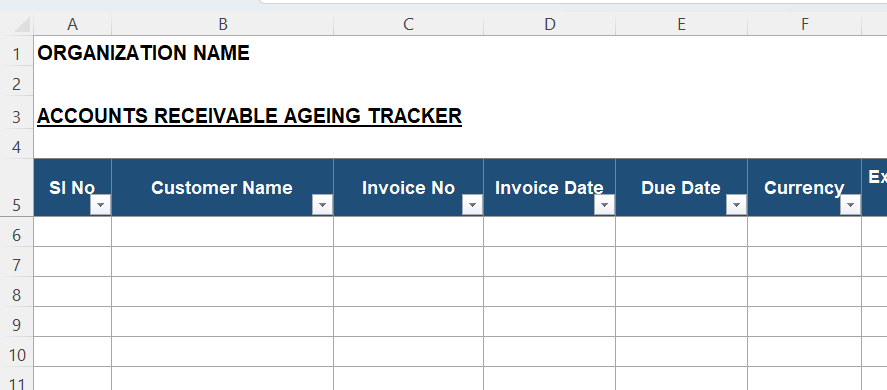
The above image is only a preview. This Accounts Receivable Ageing Tracker Excel Template helps businesses monitor unpaid customer invoices with better control. It tracks invoice details, due dates, currency, exchange rate, collections, balance amount, ageing days, ageing bucket, follow-up status, and payment priority. Therefore, finance teams can review receivables faster and act on overdue invoices.
This template is useful for businesses that sell on credit. It helps track customer-wise outstanding amounts in a structured format. Also, it supports follow-up planning because each invoice can carry status and priority. Therefore, users can identify which receivables need urgent action.
The tracker includes a usage information sheet, a blank ageing tracker, a sample filled sheet, formula guidance, and dropdown values. So, users can understand how to enter data correctly. Further, the formula columns reduce manual calculation effort. The file helps users maintain a professional receivables monitoring record.
Who can use this template?
Business owners can use this template to review customer outstanding amounts. Accountants can use it for monthly receivables follow-up. Finance managers can use it during collection review meetings. Also, sales coordinators can use it to track customer payment commitments.
This template suits manufacturers, traders, consultants, service providers, agencies, wholesalers, exporters, distributors, and MSMEs. Moreover, companies dealing with both Indian and foreign customers can benefit from the currency and exchange rate columns. The template includes INR conversion, which helps compare receivables across currencies.
The file can support invoices in INR, USD, EUR, GBP, AED, SGD, or other currencies. Users can enter the applicable exchange rate to INR. Then, they can review invoice value and balance amount in Indian Rupees. Therefore, foreign currency receivables become easier to monitor.
Why is this template useful?
Many businesses lose collection focus because invoices remain scattered across emails, accounting software, and manual notes. However, this accounts receivable tracker puts important collection details in one Excel sheet. It captures customer name, invoice number, invoice date, due date, invoice amount, amount received, and balance amount. Therefore, users can see receivable status at a glance.
The ageing calculation helps identify how old each unpaid amount is. The ageing bucket helps classify dues into 0-30 days, 31-60 days, 61-90 days, 91-180 days, and above 180 days. Therefore, businesses can prioritise overdue customers. Also, payment priority helps finance teams focus on high-risk receivables first.
The follow-up status column supports daily collection tracking. Users can mark whether follow-up is pending, in progress, promised, escalated, disputed, or closed. Therefore, the tracker becomes useful during receivable review meetings. Also, the remarks column helps record payment commitments and customer responses.
This downloadable Excel receivables template is better than a generic outstanding list. It combines invoice tracking, ageing analysis, INR conversion, collection follow-up, and payment priority. Therefore, users can improve cash flow control with a simple file. Finally, it helps reduce missed follow-ups and improves collection discipline.